
How does a powered exoskeleton know when to help you?
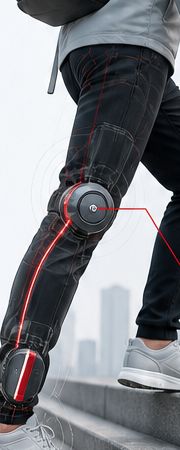
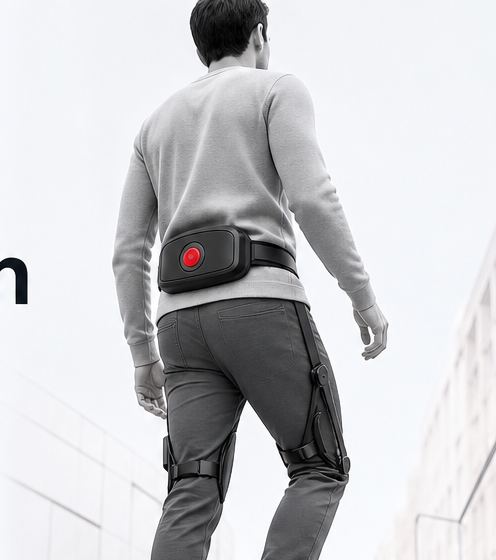
By reading your movement continuously. Sensors track how your thighs are moving and where you are in each step; a controller recognises the pattern of walking, climbing or sitting and releases torque at the moment the hip starts to lift. The ExoStride US-H-1.0Pro does this automatically: it reads the gait, delivers assistance inside the flexion window, switches profile between level ground, stairs and steep terrain, and pauses when you sit. There is nothing to adjust while walking.
The problem every powered exoskeleton has to solve
A motor at the hip can push the thigh forward. The hard part is knowing when. Push a fraction too early or too late and the assistance fights your stride instead of helping it. Push the same way on a staircase as on a flat pavement and it feels wrong on one or the other. Push while you are sitting down and it is a nuisance.
So the real intelligence of a powered exoskeleton is not in its motor. It is in how it reads your walking.
What the sensors measure
Wearable exoskeletons commonly use some combination of:
- Joint angle sensors, which measure how far the thigh has swung relative to the pelvis.
- Inertial measurement units (IMUs), small chips like those in a phone that measure acceleration and rotation.
- Motor feedback, which tells the controller how the joint is moving and how much force is being applied.
Together these give a picture, many times a second, of where each leg is in the walking cycle. Exact sensor designs differ between manufacturers and are not usually published in detail.
From readings to a decision
The controller turns those readings into decisions:
- Phase: where am I in the step? The moment that matters most for hip assistance is when the leg begins to swing forward and lift, the flexion window.
- Activity: am I walking on the flat, climbing stairs, going up a slope, going down, standing still or sitting?
- Amount: how much assistance does this activity call for, within the level set at the fitting?
For the US-H-1.0Pro, the published behaviour is that it reads gait continuously, releases torque inside the flexion window, switches assistance profile between level ground, stairs and steep terrain on its own, and uses posture detection to pause when you sit. Peak torque is 16 Nm on the spec sheet.
Why timing beats strength
A useful way to picture it: a friend gives your thigh a well-timed nudge forward and up each time you start to step. A gentle nudge at the right moment helps. A strong shove at the wrong moment throws you off. This is why a high peak torque on a spec sheet means little without good timing, and why people sometimes switch off devices that feel pushy. Our 16 Nm explainer goes into the numbers.
What changes on stairs, slopes and descents
- Level ground: assistance is light. Many users describe it as walking on ground that slopes slightly downhill.
- Stairs and climbs: each step requires lifting the leg higher against gravity, so assistance ramps up. This is where the manufacturer's claim of up to 35% less energy on climbs applies; it is a manufacturer claim and results vary.
- Descent: going down is a control problem, not a power problem. The US-H-1.0Pro reduces assistance so it never pushes you forward, and the handrail remains your main aid.
Sitting, standing and stopping
Posture detection pauses assistance when you sit and resumes when you stand. That makes a bench at the bus stop or a seat on the train uneventful. Our guide to sitting on the MRT or bus with an exoskeleton covers the practical side.
Why there is no app needed to walk
If a device needs you to choose a mode before a staircase, you have to think about the device instead of the stairs. Automatic switching removes that step. The US-H-1.0Pro starts with one button, and the optional app is used only for settings. That design matters most for older users and for anyone who simply wants to walk.
What it cannot sense
- It does not sense balance problems or catch a fall.
- It does not know your destination or how tired you are.
- It does not detect a slippery surface; grip is down to your shoes and the handrail.
Powered versus passive
This kind of sensing is what separates powered devices from passive spring-based ones, which respond mechanically and cannot change behaviour between terrain types. See powered vs passive exoskeletons.